
Airbum - Share together
AirbumEvents
4.610.00 Reviews
- Version
- 2.2.96
- Installs
- 50.00K
- Age Rating
- Everyone
Screenshots






Our Review of Airbum - Share together
 Analysis by Appyee
When a group comes home from the same gathering with dozens of photos scattered across different phones, sharing them can become its own chore. That’s the gap Airbum - Share together aims to fill: a shared place where people can contribute pictures and revisit an event together. I find the idea most useful when the memories belong to a group, not just to the person who happened to take the best shots.
When the connection becomes part of the experience
A shared album is only as convenient as the path into it. With Airbum, invitations and contributions depend on people being able to open the album and get their pictures into it, so a weak or unavailable connection can interrupt the moment when everyone is trying to share. I would set expectations before a busy event: tell guests how the album works while there is time to sort out access, rather than waiting until the group is already moving on.
This matters particularly at a crowded venue, a park, or a trip stop where people may have different network conditions. The app’s appeal is that it gathers contributions in one place, but that does not mean every upload will appear instantly in every situation. If someone’s pictures are slow to arrive, I would avoid asking them to send the same batch repeatedly; first check whether the album is accessible and give the upload time to complete. That simple habit can prevent duplicate effort and confusion.
Useful on phones, but best with a little planning
Airbum is an Events app from Airbum, built around shared photo and video collections rather than general-purpose messaging. The practical difference is focus: a chat is good for quick reactions and conversation, while an event album gives the group a destination for the images themselves. I prefer that arrangement when the goal is to collect everyone’s perspective without making the photos disappear into a long message thread.
A realistic example is a family celebration where one person is greeting guests, another is taking pictures, and others are busy helping. The host can prepare an album and share its invitation early, then guests can contribute when it suits them. That avoids the familiar after-event round of asking each person to send pictures individually. It also gives quieter guests a straightforward way to add their view without needing to join a busy group conversation.
What to do when sharing gets stuck
The smoothest workflow still has a few points where people can hesitate: opening an invitation, figuring out which album to use, or waiting for a contribution to show up. I would keep the invitation message clear and include a short explanation of what the album is for. If a guest is unsure, a direct reminder to open the shared album before selecting pictures is more helpful than sending repeated instructions or assuming the upload has failed.
For hosts, the useful trade-off is between an open, easy invitation and a carefully limited group. Before sharing a link, decide who actually needs access and send it through a channel the intended guests already use. That small bit of organization helps keep a private event collection from being passed around casually. Airbum is most convincing when the group has a shared purpose and someone takes responsibility for making the first step obvious.
Keeping mobile data and storage in mind
Photos and videos can be substantial, especially after a long event, so I would not treat a shared album as a reason to upload every burst, duplicate, or accidental pocket shot. A quick selection before contributing makes the collection easier for everyone to browse and can reduce unnecessary mobile data use. If a group is travelling, contributors can also choose a convenient time and connection for larger batches rather than trying to send everything during a busy moment.
Airbum is free to install, with optional in-app purchases listed from $2.99 to $54.99 per item. It has a 4.6 average from around 956 ratings and more than 50,000 installs. Those figures suggest that the shared-album idea has found an audience, but the important question for me is still whether your group will actually use one common destination. If friends prefer to keep their pictures private or already have a routine they like, an extra app may add friction instead of saving time.
Who will get the most from a shared album
I would recommend trying Airbum for reunions, group trips, celebrations, and other occasions where several people take pictures of the same event. It is especially handy when the organizer wants one collection rather than a chain of private requests. It is less suited to someone who mainly wants a personal photo library, advanced editing tools, or a conversation-first space; a phone’s gallery, an editing app, or a group chat may fit those jobs better.
There is also a useful social consideration: not everyone wants to contribute every photo they take. A shared album works best when participation feels optional and the group understands its purpose. I would invite people who are comfortable sharing, rather than treating the album as a complete record of the day. That keeps the process friendly and avoids turning a casual gathering into a request for everyone to document it.
Airbum is rated for Everyone, was released on May 18, 2022, and its current version is 2.2.96, with Android 7.0 or later required. The age rating makes it broadly accessible, though parents and event organizers should still use ordinary care when deciding who receives an album invitation and what images are appropriate to share. For a mixed-age family event, explaining the album to guests is a sensible step regardless of how simple the app feels.
What’s the Buzz About?
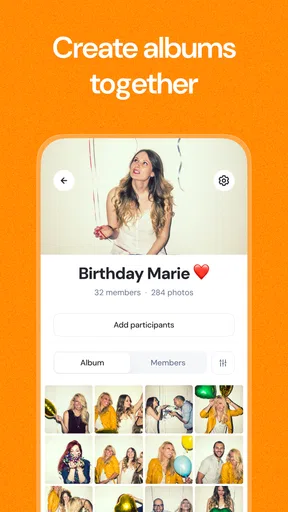
So, what exactly is Airbum - Share together? Think of it as your personal cloud-based album that’s super easy to manage. You create albums, invite your friends or family, and voila! Everyone can add their photos to the same album without the fuss of downloading or emailing pictures back and forth.
Getting Started: The Setup
First things first, the setup is a breeze. You can download it from the App Store or Google Play, and it doesn’t take up much space on your device. Once you’re in, the interface is super intuitive. I didn’t even need a guide to get going. Just create an account, and you’re ready to roll.
One of the coolest things? You don’t need to be a tech wizard to use it. The app guides you through every step, making it super user-friendly. Plus, it’s loaded with little tips and tricks to enhance your experience.
Sharing Made Simple
Creating an album is as easy as pie. You just hit the create button, name your album, and start adding photos. What’s even better is the way you can invite others to join. Just share the link or send an invite via email or text. Whether they're tech-savvy or not, anyone can join in on the fun.
The real magic happens when everyone starts uploading their photos to the same album. It’s like having everyone’s perspective of an event neatly bundled in one place. No more missing out on those candid shots your friend captured!
Features That Stand Out
Airbum isn’t just about sharing photos; it’s about making it a seamless experience. Here are a few features that I absolutely loved:
- Real-time Updates: As soon as someone adds a photo, it’s instantly available for everyone in the album.
- High-Quality Uploads: None of that pixelated mess. The app keeps your photos crisp and clear.
- Privacy Controls: You decide who gets to see and add photos. Perfect for keeping things just among friends or family.
Why You'll Love It
Imagine going on a trip with friends. Instead of each person having their own set of photos stored away on their phone, everyone uploads their pics to a shared album. Later, you can all reminisce over the same set of memories, each from different viewpoints.
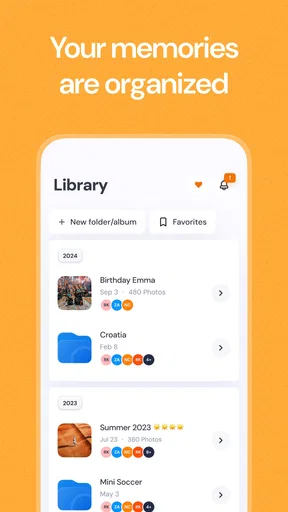
Plus, if you’re a bit of an organization freak like me, you’ll appreciate how easy it is to manage and organize photos. No more scrolling endlessly trying to find that one picture. It’s all neatly categorized and easy to access.
But Wait, There’s More!
Okay, I might be getting a bit carried away, but there’s something about Airbum that makes sharing photos genuinely enjoyable. The app is constantly updated with new features and improvements, based on user feedback, which is always a good sign.
And if you ever hit a snag, their customer support is pretty responsive. I had a minor issue while sending an invite, and their team was quick to jump in and help out.
Wrapping up, Airbum - Share together is more than just an app; it’s a tool that brings people closer through shared memories. Whether you’re tech-savvy or not, this app makes photo sharing a breeze. So, next time you’re at an event, don’t just snap photos—share them with Airbum and let everyone join the fun!
Making an album easier to use later
A little planning can make a shared collection more useful after the event, too. I like giving an album a name that identifies the occasion rather than using a vague label, especially if I expect to create more than one. When inviting a group, a brief note about which event the album is for can prevent someone from adding pictures to the wrong place. These are small habits, but they matter more when several gatherings happen close together.
It is also worth thinking about the album as a contribution from many people, not a polished photo book. Different phones, framing choices, and timing will produce a mixed collection. That variety is part of the point, but it means the result may not be perfectly curated. If I wanted a carefully edited selection for printing or presentation, I would first gather the images and then choose a separate editing or layout tool for the finishing work.
Choosing between Airbum and familiar alternatives
Compared with sending photos one by one in a messaging app, a shared album is a more deliberate home for the event’s pictures. Messaging is still better when people need to talk in real time, react to a single image, or share something with only one person. A general cloud folder may suit groups already comfortable managing files, while a social network can be convenient when the audience is broad and public sharing is acceptable. Airbum makes most sense when the priority is a focused event collection for a defined group.
The trade-off is that every guest must be willing to use the same destination. If the group is small and already shares pictures through a familiar service, asking everyone to install or learn another app may feel unnecessary. I would test the invitation flow with one or two people before sending it widely, especially for guests who are less comfortable with apps. That quick check can show whether the setup is clear enough for the actual group.
Small decisions that prevent a messy collection
For a wedding, reunion, or large trip, I would choose an organizer who can explain the album and answer basic questions, rather than leaving every guest to work it out independently. I would also make the invitation available early, so nobody has to search through old messages while trying to take pictures. If an upload seems delayed, check the connection and the album choice before asking someone to start again; a calm check is usually more useful than repeating the process.
Think about the event’s privacy before inviting people. A link is convenient, but convenience is not the same as knowing who will see the contents. Share invitations only with the intended group, and be thoughtful about photos that include children, guests who prefer not to be photographed, or private moments. The app can help organize contributions, but the group still sets the social boundaries around what belongs there.
How I would use it on an ordinary day
Picture a day trip with a few friends. One person takes landscape shots, another catches candid moments during lunch, and someone else records short clips. Rather than interrupting the outing to pass phones around or flooding the chat, the organizer can point everyone to one album. People can contribute when they have a suitable connection, and the group can look through the shared set afterward. The value is not a complicated feature; it is avoiding the awkward coordination that usually happens once everyone is back home.
That workflow depends on the group knowing where to contribute, so I would put the invitation somewhere easy to find and keep the album’s purpose simple. I would not make participation a condition of joining the outing, and I would not assume every person wants to upload every image. The best shared collection is one that feels helpful rather than like another task.
Where I draw the line
Airbum is not my first choice when I need to edit images, manage a large personal archive, or guarantee that every guest can contribute regardless of network conditions. In those cases, a dedicated photo editor, a library app, or a different sharing method may be more appropriate. Its strength is narrower: bringing an event’s contributions together. If that is the problem you have, the focused approach is appealing; if you need a full photo-management system, it should not be mistaken for one.
My overall view is that Airbum is worth considering when a group genuinely wants to collect memories in one shared place and is comfortable using an app to do it. I would prepare the album and explain the invitation before the event, keep contributions considerate of data and privacy, and use another tool when editing or long-term library management matters more. Its connectivity-dependent workflow rewards a little forethought, and for the right occasion that small bit of coordination can make sharing feel much less scattered.
Verdict
Strengths of Airbum - Share together
- User-friendly interface makes sharing easy.
- Supports a variety of media types.
- Allows private sharing with select groups.
- Fast upload speeds for large files.
- Cross-platform compatibility.
Limitations of Airbum - Share together
- Limited storage in free version.
- Occasional connectivity issues reported.
- Requires account creation to use.
- Some features locked behind paywall.
- Notifications can be overwhelming.
Similar Picks in This Category
View All
Easy Quran Mp3 Audio Offline
Muslim Worldapp4.7

Invitation Maker: Cards & RSVP
Greetings Island4.9

StubHub - Live Event Tickets
StubHub4.3

Fever: Events & Tickets
Fever Labs4.7

Epic Freebie Games Radar
Arioch Pds - Apps & Games4.4

Invitation card Maker, Design
Splendid App Maker4.9
Frequently Asked Questions
What is Airbum - Share Together?
Airbum - Share Together is a social app designed to streamline the way users share photos and videos with friends and family. It offers an intuitive interface that allows for easy creation and sharing of personalized albums. Users can collaborate in real-time, making it perfect for group events and memories.
Is Airbum - Share Together free to use?
Yes, Airbum - Share Together is free to download and use. However, there might be in-app purchases or premium features available for users who wish to enhance their experience with added functionalities. These optional purchases can include additional storage or exclusive content options.
How secure is the data shared on Airbum - Share Together?
Airbum prioritizes user privacy and data security. All media shared through the app is encrypted, ensuring that only the intended recipients can access the content. The app also offers privacy settings that allow users to control who can view and interact with their shared albums.
Can I use Airbum - Share Together offline?
While Airbum requires an internet connection for initial sharing and syncing, users can view previously downloaded photos and videos offline. This feature is particularly useful for accessing memories when traveling or in areas with limited connectivity. However, new uploads and edits will sync once back online.
What platforms is Airbum - Share Together available on?
Airbum - Share Together is available on both Android and iOS platforms. Users can download the app from the Google Play Store or the Apple App Store, ensuring compatibility across a wide range of smartphones and tablets. Regular updates are provided to enhance functionality and fix any bugs.
